

Most influencer reporting arrives after the budget is spent and the content is live. At that point, you can explain performance, but you can’t change what happens next. A live influencer analytics dashboard changes the timing. It gives you signals while the campaign is still fixable, so you can adjust deliverables, shift formats, tighten guardrails, and move spend toward what’s working.
This guide shows how to structure a dashboard around the decisions you actually make during a campaign. Not more metrics but better signals that help you act this week, reduce waste before it grows, and walk into renewals with evidence you can defend.

Most teams can pull the basics: posts, impressions, engagement rate, clicks. The frustration shows up when the decisions get real, like renewals, budget approvals, and ROI narratives. Many dashboards stop being useful because they were built to recap outcomes, not guide next steps.
When a dashboard is mostly totals and screenshots, three problems show up fast:
A negotiation-ready dashboard fixes this by turning influencer analytics into proof you can use while the campaign is still running.

If you only set up a few things at first, make them decision-makers:
Pacing vs expected (by creator + format)
Cost per outcome (pick one KPI that matches your goal)
Engagement quality trend (not just engagement rate)
New-to-brand reach or audience overlap
Comment sentiment plus risk flags (within 24 to 48 hours)
If your dashboard can answer those five consistently, you can already renew more confidently and course-correct before money is wasted.

A metric is dynamic when it updates fast enough to change what you do next, and when it points to a clear move. Dynamic metrics help you spot what’s working early, cut waste before it compounds, and adjust deliverables while results are still recoverable.
Here’s the difference that matters day to day.
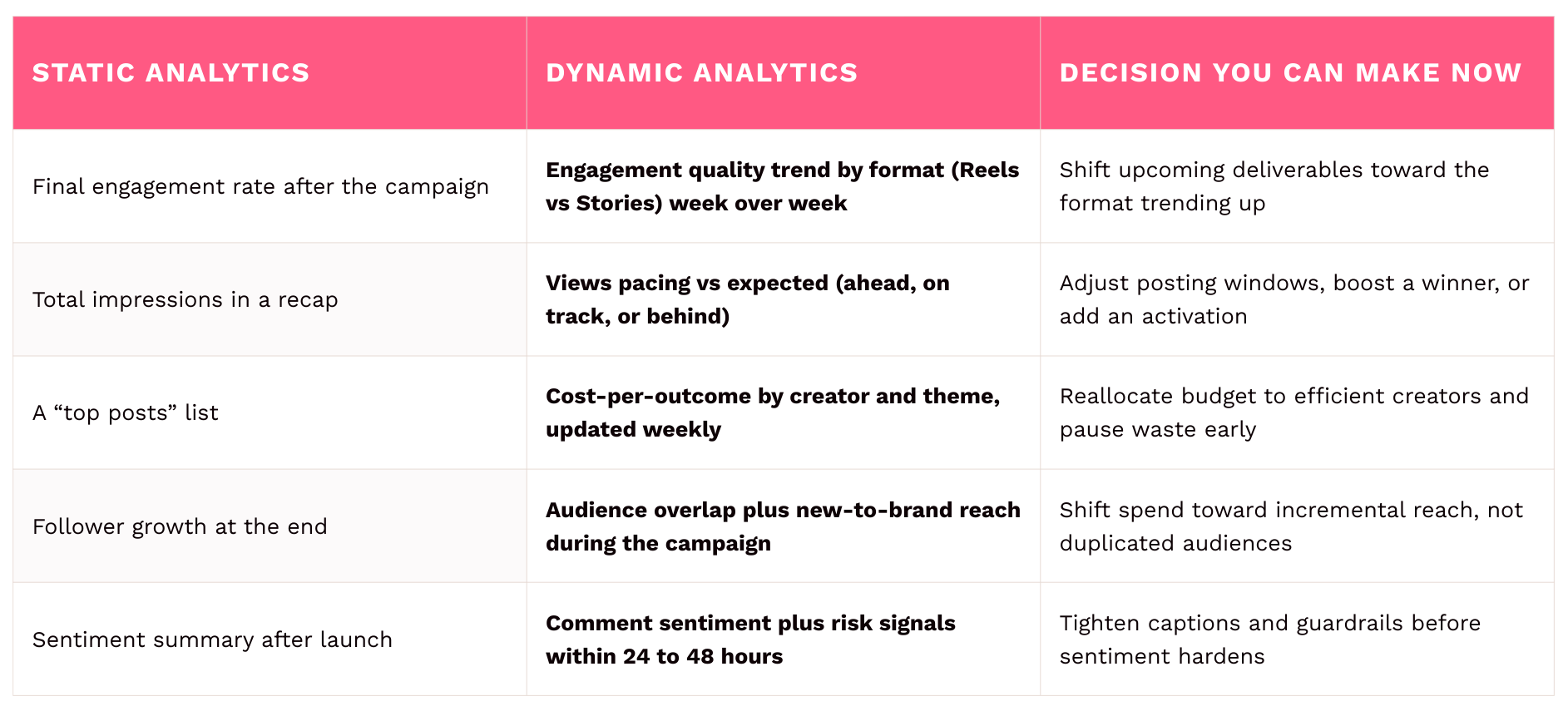
If your dashboard only does the left column, it’s a recap. Once it reaches the middle and right, it becomes a tool for weekly changes, smarter spend, and cleaner renewals.
Next comes the real upgrade: organizing those live signals so decisions are obvious.

A negotiation-ready dashboard doesn’t try to show everything. It shows the few signals that support renewals, pricing, and budget decisions, without a walkthrough.
Weekly optimizations, mid-campaign shifts, and renewal conversations all need fresh data. If your dashboard refreshes only at the end, it can’t help you negotiate.
You need to see why something performed: which formats are lifting results, which hooks and topics are landing, and where engagement quality is coming from. Otherwise you’re stuck debating “overall performance” with no next step.
Negotiations come down to what you paid and what you got. Pair outcomes with cost, like cost per view, cost per click, or cost per result. That turns “this creator did well” into “this creator delivered for the price.”
If someone needs you to explain the dashboard, approvals slow down. Build two views:

If you want a dashboard that helps you negotiate, organize it by the decisions you need to make, not by every metric you can collect. The simplest structure is a set of decision layers that move from performance signals to money decisions.
How to read this: start at the bottom (creator plus content). Move up only after you know what’s working. Each layer builds toward a pricing or budget decision.
.png?width=500&height=384&name=Copia%20de%20Tables%20(5).png)
Caption: Decision layers for a negotiation-ready influencer analytics dashboard. Each layer builds toward a pricing or budget decision, starting with creator and content performance and ending with cost and outcomes.
Alt text: Vertical stacked diagram showing four decision layers in an influencer analytics dashboard: creator results, content results, audience and comments, and cost and outcomes, read from bottom to top.
Track whether each creator delivers steady reach, strong engagement quality, and the right audience over time. Include pacing and trend signals, not just totals, so you can renew with confidence, adjust rates, or stop spending when results slip.
Break performance down by format (Reels, Stories, posts) and creative approach (hook, topic, CTA). This is where you decide what goes live next and how you update the brief.
Track who is seeing the content, what they’re saying, and how much audiences overlap across creators. This layer helps you avoid paying three times for the same people, and gives you time to intervene before sentiment hardens.
Put cost beside results and show whether you’re ahead or behind plan. This is where you set a reasonable renewal rate, compare creators fairly, and decide where to add or cut budget.
Takeaway: The lower layers help you improve results this week. The top layer helps you make pricing and budget calls with proof.
Use this as a fast gut check. If you can’t say “yes” to most of these, your dashboard is reporting, not negotiating.

Whether you use Influencity or another platform, the capabilities matter when you need to defend spending or renegotiate terms. A negotiation-ready dashboard depends on complete capture of content, clean totals, and views you can share without rebuilding slides.
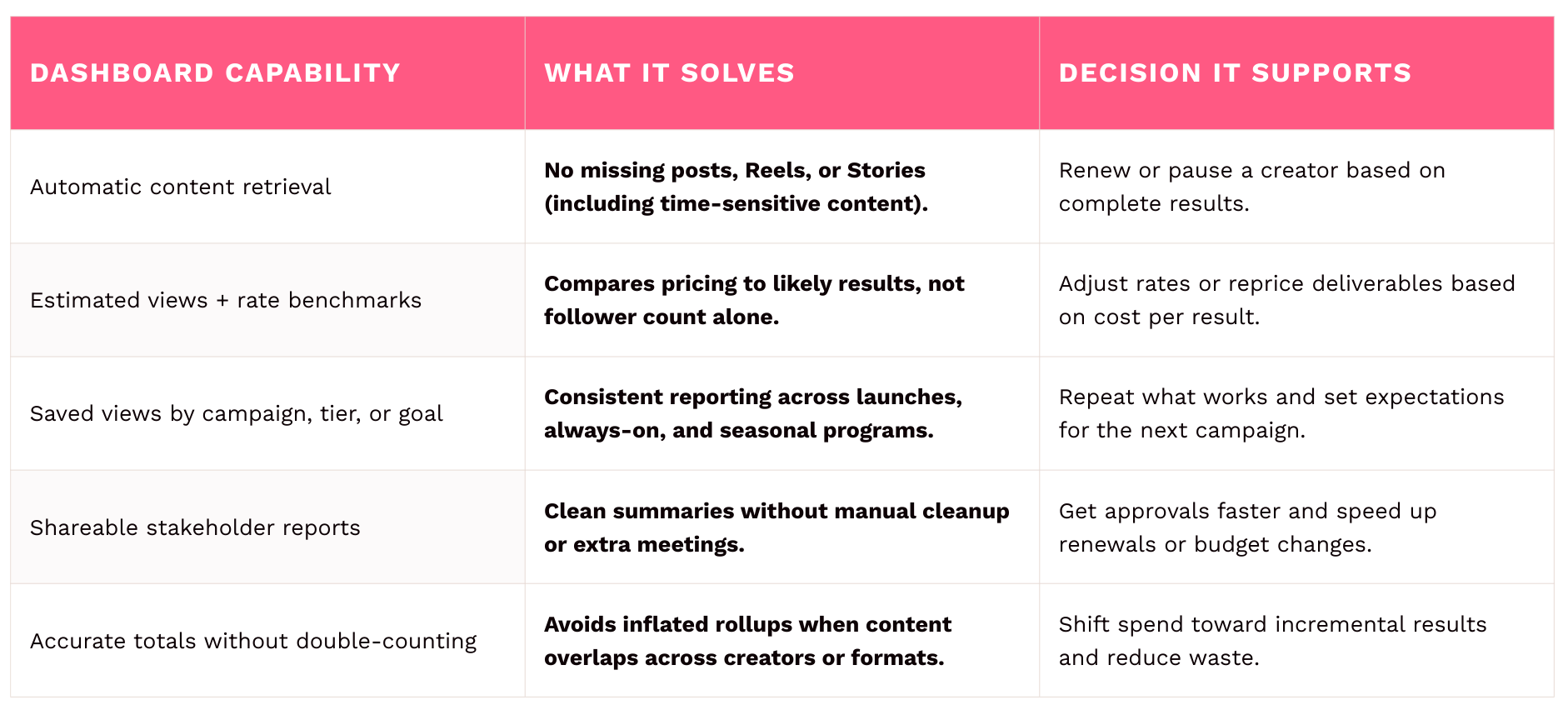
Tools capture the truth. Habits turn that truth into budget decisions.

Rule of thumb: every chart should answer “What do we do next?”
Three habits make the dashboard usable in practice:

Use this quick scan to spot what to keep, add, or remove.
.png?width=1905&height=860&name=Tables%20(16).png)
Takeaway: A dashboard is only “good” if it leads to a change: timing, format, deliverables, spend, or renewal terms.
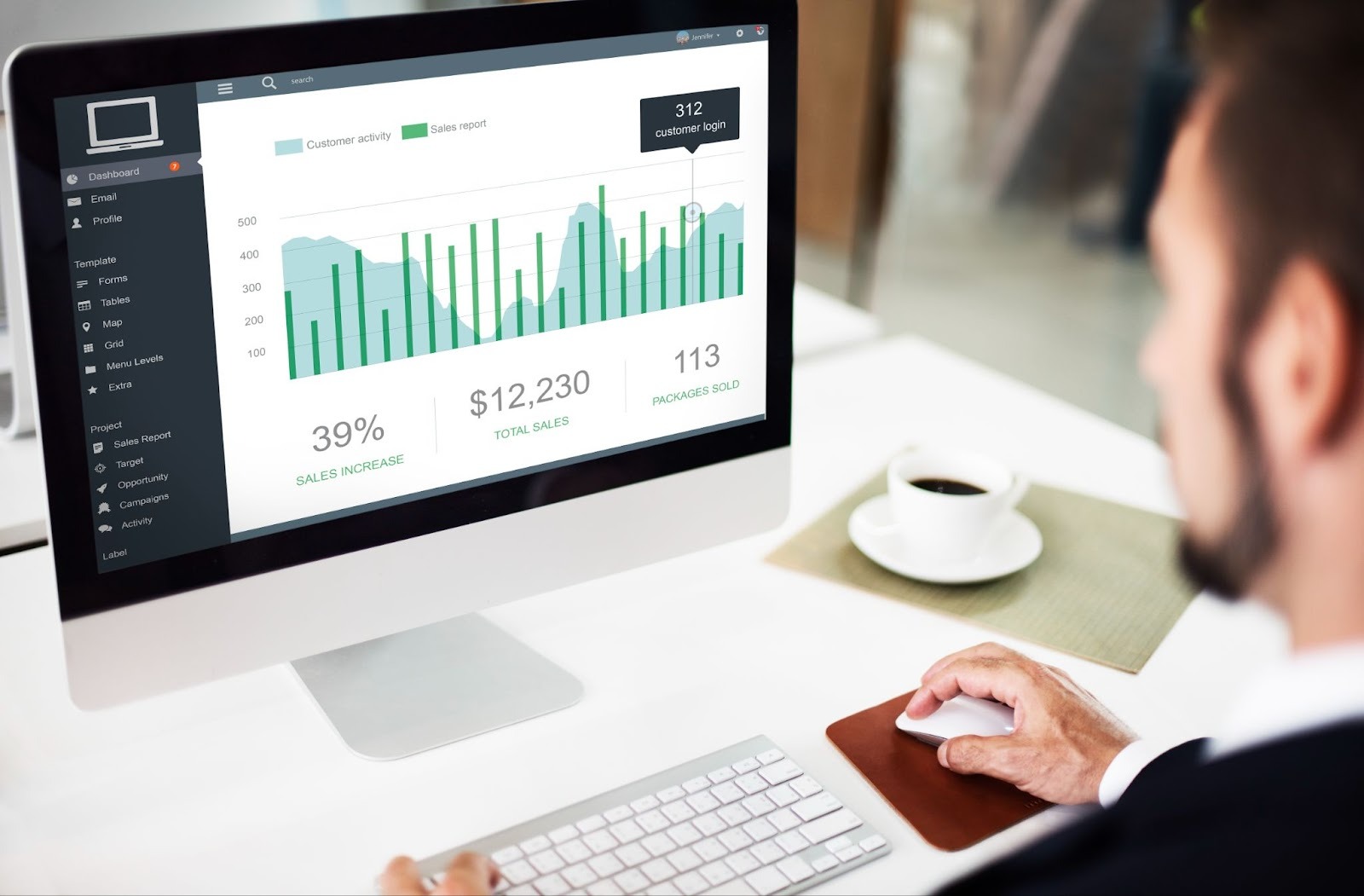
When your dashboard ties creator performance to cost and outcomes as results come in, you stop guessing what to pay. You can renew with proof instead of averages, and you can defend budget with decisions, not spreadsheets.
If you want the fastest path to value, build Layer 1 (Creator Results) and Layer 4 (Cost plus Outcomes) first. Once those two layers drive weekly actions, add Layer 2 (Content Results) and Layer 3 (Audience plus Comments) to tighten creative direction and reduce risk.
That’s how influencer analytics stops being a recap, and starts negotiating for you.











%20and%20How%20Can%20They%20Benefit%20Your%20Brand%20article.jpg?length=628&name=What%20Are%20Key%20Opinion%20Leaders%20(KOL)%20and%20How%20Can%20They%20Benefit%20Your%20Brand%20article.jpg)








.png?length=628&name=Pop-up%20image%201200%C3%97800@1x%20(1).png)