

It’s easier to get budget approval when you and your finance team can forecast the impact. That is why your creator program belongs in the marketing business plan. Spell out three basics: who you will hire and what they will deliver (tier mix), how you can reuse their work across channels (usage terms), and which numbers will tie creator content to sales and cost (metrics).
With those in place, budgets are clearer and approvals move faster. In this article, we show how Logitech and Atlassian plan formats, set tracking, and report results leaders trust. We also map the handoffs with other teams so ads, emails, product pages, and help docs are ready to reuse creator assets on day one.
Before we dive into Logitech and Atlassian, lock in the basics that make any creator plan fundable and repeatable. Use this quick checklist as your setup, then we’ll show it in action.
Before you allocate creators to the marketing budget, ensure these basics are in place. Think of them as the minimum plan you need so finance can forecast, legal can approve, and adjacent teams can reuse assets without a scramble. Each move names what to decide now and what you’ll deliver later.
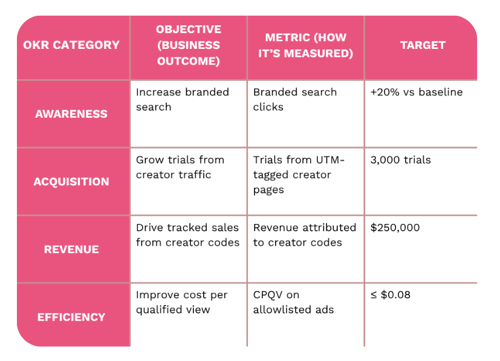
Pick 1 to 2 OKRs your program will support and name the target (i.e., how much, of what, by when, measured the same way finance does).
Quick examples of OKRs
1. Choose platforms by job to be done: short-form proves fast; long-form teaches; visual feeds inspire; professional networks persuade.
4. Plan amplification and search early: decide titles, descriptions, cutdowns, captions, and allow listing in the brief.
5. Set up tracking with UTMs and codes: use one naming format, add holdout groups (i.e., control groups), and link each asset to a page and a KPI.
6. Publish, lift with paid, route to email and CRM: ship day-one reuse to ads, PDPs (Product Detail Pages), onboarding, and help docs.
7. Report results and learning monthly: compare regions with and without paid lift; carry winners into the following brief.
With the setup locked, place the creator program inside the marketing business plan so timing, rights, and reuse are approved before production.
The goal here is to place creator content on the yearly roadmap, including dates, owners, and reuse paths, so finance can forecast. Decide which selling windows you will support, publish assets 6–8 weeks before each one, and name who will reuse every clip on PDPs, in emails, ads, and help docs. When creator work sits next to media and product milestones, budgets clear faster, and every asset works harder across channels.
Now that creators are part of the marketing business plan, assign each channel a specific role. This keeps formats focused and makes reuse simple across ads, PDPs, email, and docs.
Logitech Pattern
TikTok and Reels
YouTube
Owned reuse
YouTube
Webinars → clips
Decide these in the brief, not after filming.
With channel jobs set and amplification rules defined, line up the teams that will reuse each asset so every clip lifts more than one touchpoint.
Use this matrix to turn creator clips into company-wide leverage. It names who decides what, where each asset will be reused, and how results are tracked—so teams don’t wait on approvals or recuts. Add it to your marketing business plan and share it in weekly launch standups; when every channel owner knows their “Decide / Why / Handoff,” the same video can power ads, PDPs, email, help docs, and sales decks with less cost and more lift.
|
Channel (Owner) |
Decide |
Why |
Handoff |
|
Paid media |
Allowlisting, usage rights, cutdowns, captions, titles, tracking |
Faster ad production and higher CTR when clips are pre-cleared |
Media lead receives raw files and approved copy |
|
Website & PDPs |
Which pages host which videos, schema, thumbnails, transcripts |
Higher time on page and add to cart near decision points |
Web lead gets file specs and embed plan |
|
SEO |
Target queries, video titles, descriptions, internal links, alt text |
Search lift for model and feature terms from indexed content |
SEO lead aligns titles and links before publishing |
|
Email & CRM |
Lifecycle placement in welcome, onboarding, win-back flows |
Higher click and activation when creator proof appears in sequences |
CRM lead gets cutdowns and copy blocks |
|
Social & community |
Platform ratios, pinning rules, repost windows |
Quicker distribution and consistent messaging across profiles |
Social lead receives posting calendar tied to releases |
|
Retail & merch pages |
Retailer rights, in-store screen specs, PDP syndication |
Consistent proof at point of sale and fewer re-cuts |
Channel marketing gets licensed versions and usage notes |
|
Sales enablement |
Clips for decks, talk tracks, FAQs |
Sellers handle objections with credible creator proof |
Revenue enablement gets links and downloadable files |
|
PR & events |
Creator appearances, live demos, recap content |
Stronger coverage and reusable content from the same effort |
Comms lead secures releases and coordinates schedules |
|
Product & documentation |
Which features get tutorials, version control, Help Center embeds |
Fewer support tickets and faster time to first value |
Docs owner receives final files and transcript text |
|
Data & measurement |
UTM structure, promo codes, holdouts, readout cadence |
Clean attribution and credible learning loops |
Analytics lead owns dashboards and monthly reviews |
|
Legal & compliance |
Disclosures, exclusivity windows, countries, approval checkpoints |
Risk reduction and fewer blocked launches |
Legal signs the template once, then approves by content ID |
|
Localization |
Subtitle languages, voiceover rules, market swaps |
Faster reuse across regions with consistent quality |
Localization gets scripts and time-coded files |
|
Partner & affiliate |
Partner codes, co-marketing pages, payout rules |
Simpler tracking and fewer one-off requests |
Partner team receives creator list and code map |
|
Support & success |
Clips for onboarding, troubleshooting, first-week tips |
Higher activation and lower churn from task-based videos |
CX gets a playlist and embed instructions |
To operationalize this, maintain a creator content reuse matrix with columns for channel, owner, asset, specs, rights, tracking, and due date.
Attach a standard file kit for each creator that includes the raw video, clean captions, a thumbnail, a transcript, the project file, and a clear naming convention. Run a weekly content standup with media, web, CRM, and analytics teams to ensure dates stay aligned with launches.
Tier mix

Usage terms
Metrics that tie inputs to revenue and efficiency
Formats to forecast
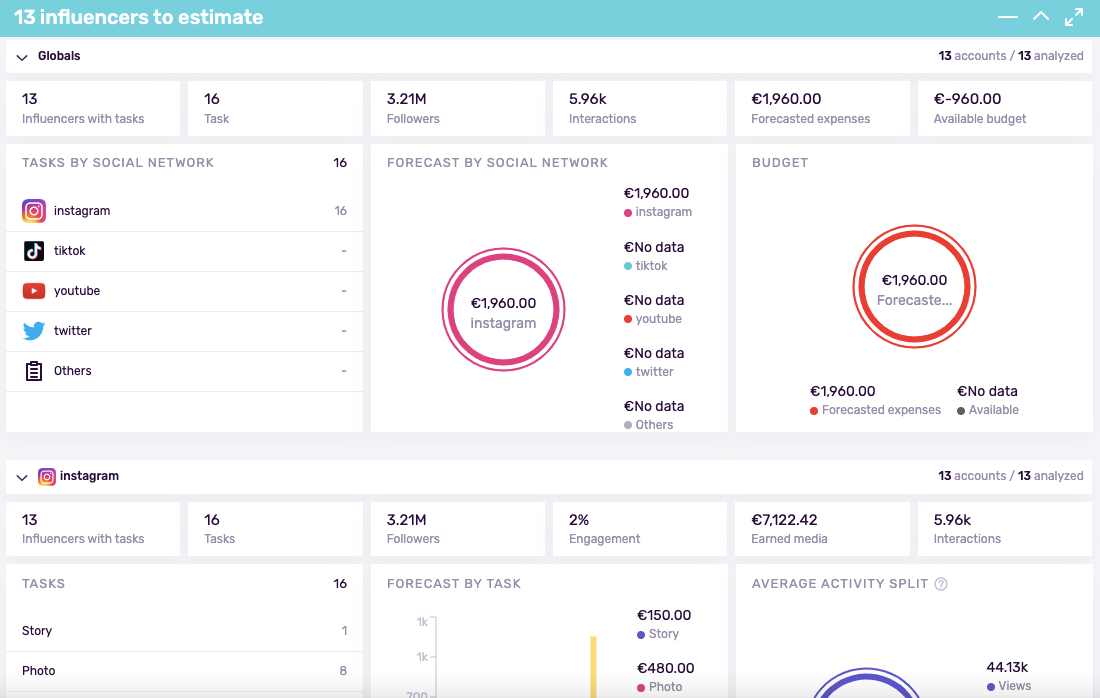
Budget logic by tier and scope
Use nano and micro creators for depth, coverage, and cost-effective testing. Add a few respected analysts or marquee voices for reach when needed. Include usage terms, exclusivity window, and asset handoff in every scope.
Map creator type to goal type
Track study deltas, search interest movement on brand and model terms, and video completion rate.
Consideration and sales
Monitor CTR, code usage, tracked revenue, and assisted conversions from pages that host creator assets.
Loyalty and efficiency
Watch earned media value, sentiment, NPS movement, and repeat purchase.
Finance-friendly design
Define baselines, holdouts, UTMs, and a monthly readout rhythm before production.
Logitech (B2C) vignette
Objective: lift Q3 webcam and mic bundle sales and grow software adoption. Shortlist 18 creators across streaming, remote work, and productivity. TikTok and Reels deliver fast fixes for lighting, echo, and framing. YouTube hosts guides for the config app, macro shortcuts, and multi-device workflows.
Rights cover paid lift, PDP embeds, and onboarding emails. KPIs include click-through rates to product pages, bundle attachment rates, config app downloads, and newsletter sign-ups from setup guides. UTMs and creator codes attribute results to each asset. Regions with and without allowlisting act as holdouts. Monthly readouts compare topics, titles, and thumbnails so the next batch targets the biggest friction points.

Atlassian (B2B) vignette
Objective: increase trials for Jira Software and drive adoption of automation rules. Recruit 10 practitioner educators and two analyst voices. YouTube houses task-based tutorials, including sprint setup, backlog hygiene, and incident review. LinkedIn carousels turn features into repeatable workflows and link to trials. A live webinar is converted into clips for the newsletter and Help Center. KPIs include trials started, workspace activations within seven days, MQL to SQL rate, influenced pipeline, and admin newsletter CTR. UTMs and unique trial codes attribute results. Rights cover six months for paid social and sales decks. Monthly readouts compare regions with and without creator lift.
Weeks 1–2: set direction. Confirm OKRs, audiences, product priorities, and budget split.
Weeks 3–4: source and scope. Build shortlists, vet creators, finalize briefs, and set rights.
Weeks 5–8: produce and prepare. Film tutorials, plan teasers, and set search-friendly titles and descriptions.
Weeks 9–12: launch and learn. Launch across channels, add paid lift, route assets to CRM, then publish readouts.
How much should I budget by creator tier
Set a core always-on budget for nano and micro creators, then add a launch reserve for analysts or marquee voices.
Which KPIs convince finance leaders
Pair awareness movement with hard outcomes like trials, demo requests, code usage, and assisted conversions.
Micro or macro for launch vs always-on
Use micro for depth and coverage across the year, and a few larger voices for launches.
How do creator assets support SEO and CRM
Host tutorials on search-friendly pages and route clips into onboarding emails.










%20and%20How%20Can%20They%20Benefit%20Your%20Brand%20article.jpg?length=628&name=What%20Are%20Key%20Opinion%20Leaders%20(KOL)%20and%20How%20Can%20They%20Benefit%20Your%20Brand%20article.jpg)