
Skip to content
Book a Call
Start Your Trial
Influencer marketing MCP: a campaign report built from Influencity data inside an AI chat

INFLUENCER MARKETING MCP

Put Influencity Data Inside Claude and ChatGPT with Our Influencer Marketing MCP

Ask about your creators and campaigns in plain language. Get reports, comparisons and ready-to-send text from the AI assistant your team already uses, without exporting data or writing code.

Influencer marketing MCP: a campaign report built from Influencity data inside an AI chat

Claude & ChatGPT

Works inside the AI assistant your team already has open all day.

100% Synced

Trackings and profiles you create from the chat appear in the platform too.

Same credits

Draws on your plan's analyses and tracking slots. Reading data is always free.


WHAT IS AN INFLUENCER MARKETING MCP?

Your Influencity Data, One Question Away

The Influencity MCP is a connector that lets Claude and ChatGPT work with your Influencity data. MCP (Model Context Protocol) is an open standard for connecting AI assistants to tools. You ask in plain language, the assistant reads your profiles, trackings and credits through the Influencity API, and it can create or pause trackings after you confirm.

It covers three parts of Influencity today: profiles (IRM), trackings with their reports, and credits.

01

Your team

Asks in plain words, in a normal chat.

02

Claude or ChatGPT

Understands the ask and picks the right tool.

03

Influencity MCP

Checks the brand and the cost before anything runs.

04

Influencity API

Reads or changes your brand's data. The answer comes back as a table, a summary or a text ready to send.

WHAT YOU CAN ASK

18 Tools, Zero Syntax to Learn

Nobody calls a tool by name. You ask the way you would ask a teammate, and the assistant picks the tool. Every card shows what it costs.

1 ANALYSIS

Analyze a creator

Followers, engagement, audience and credibility for any profile on Instagram, TikTok, YouTube or Twitch. Try: "Analyze @[username] on [Instagram]. Show me the cost before you do anything."

FREE IF ANALYZED

Compare 2 to 5 creators

Side by side, with the metrics you care about for the campaign in front of you. Try: "Compare @[creator1] and @[creator2] on [Instagram] side by side: followers, engagement, top audience country and estimated price per post."

FREE

Summarize a campaign

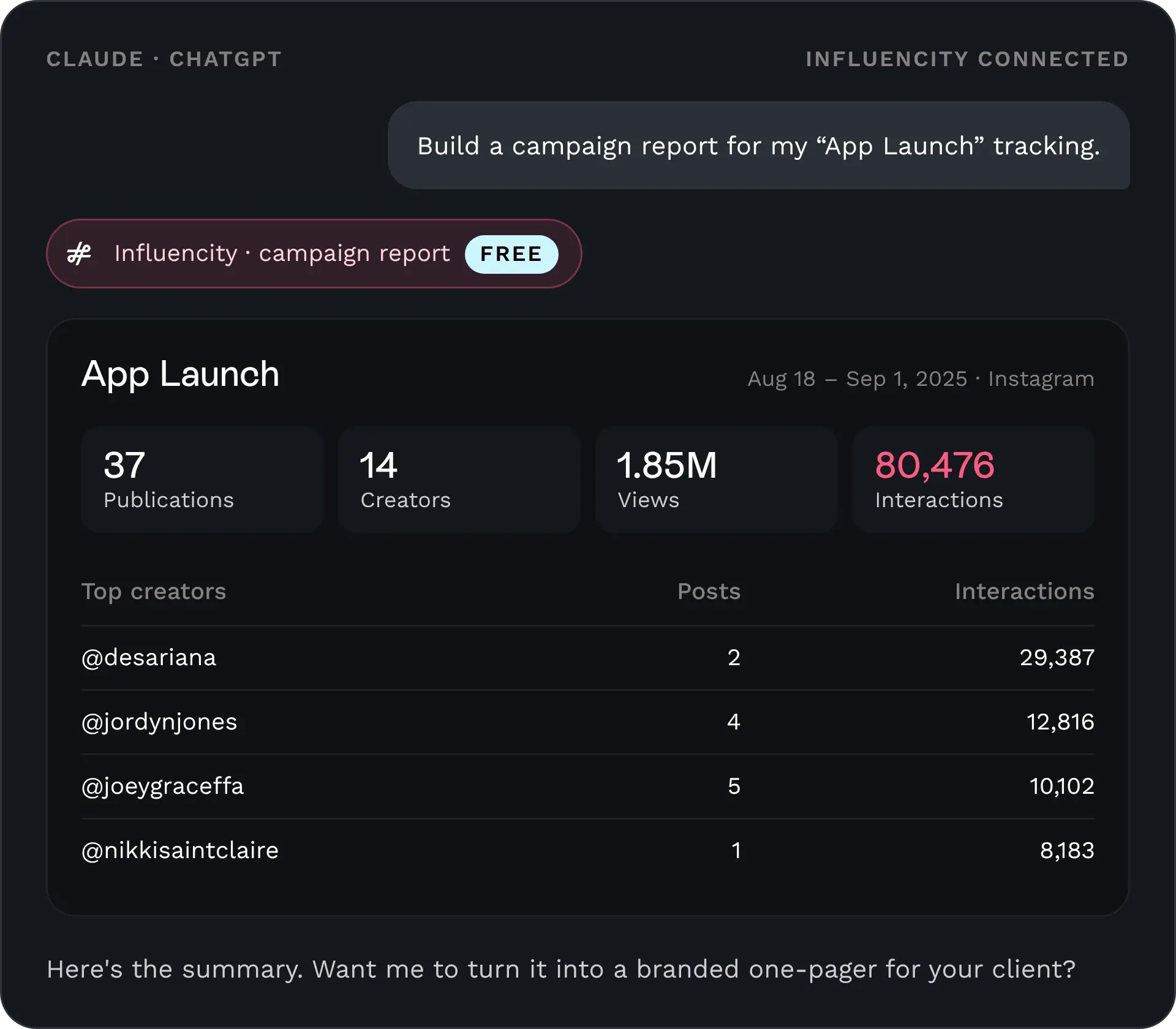
A report from any tracking: reach, interactions, engagement, top creators and weekly evolution, up to 5,000 publications. Try: "Build a campaign report for my [tracking name] tracking."

FREE TO CREATE

Create a tracking

Campaign trackings by hashtag, mention or keyword, or a tracking for a single profile. Try: "Create a tracking called [name] from [start date] to [end date] for the hashtag #[hashtag] and the mention @[brand handle]."

UP TO 1 SLOT PER CREATOR

Track up to 20 creators at once

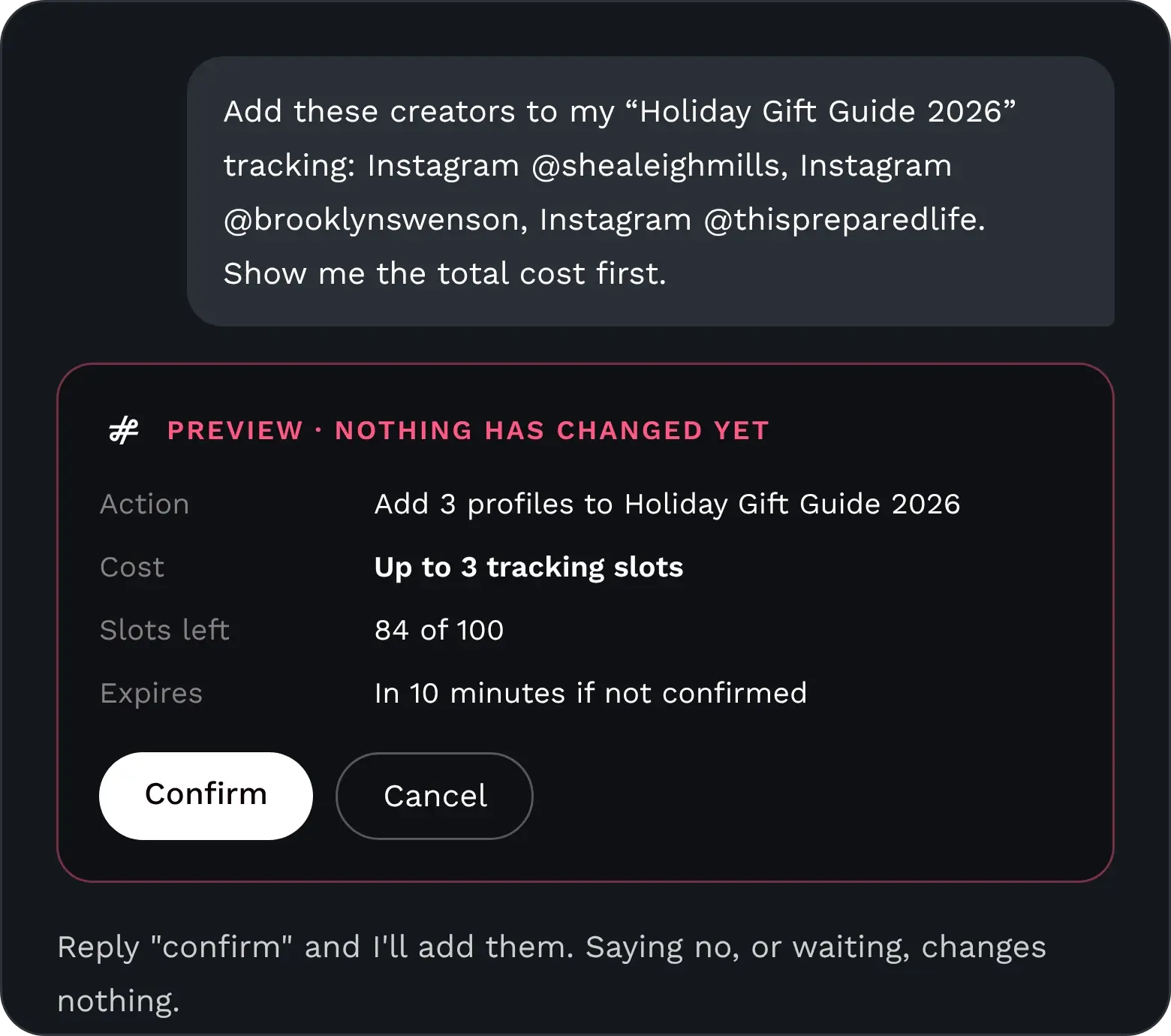
One request, one preview with the total cost. Pause, resume or refresh trackings the same way. Try: "Add these creators to my [tracking name] tracking: [Instagram @user1, TikTok @user2, YouTube @user3]. Show me the total cost first."

FREE

Check your credits

Analyses and tracking slots left, before you plan the next campaign. Try: "How many profile analyses and tracking slots do I have left in Influencity?"

WHAT TEAMS BUILD WITH IT

From a Question to a Finished Deliverable

The data comes from Influencity. What you build with it is up to you: the assistant turns it into the format your team or your client needs.

01 · REPORT Client reports with your brand, or white label

Turn a tracking into a custom report with content and metrics, in your own look and feel or your client's, and report automatically without the weekly copy-paste.

02 · SYNC Spreadsheets that stay current

Move creator and publication metrics into Excel or Google Sheets, then refresh them from the same chat instead of exporting again.

03 · BUILD Your own dashboards, pages and calculators

Build a campaign dashboard, a web page that summarizes your campaigns, or your own metric formulas on top of Influencity data.

04 · DECIDE Creator proposals built on your criteria

Put creators side by side with the metrics you choose, add your own calculations, and get a proposal ready to share with the client.

COMING SOON

Creator Discovery, Straight from the Chat

Search endpoints are next on the roadmap. When they reach the connector, the assistant will be able to look for new creators too.

Creator recommendations

Ask which creators to pick, combining Influencity data with what the assistant finds in other sources.

From brief to shortlist

Paste a campaign brief and get the creators that fit it best, with the reasons behind each one.

FROM PROMPT TO DELIVERABLE

A Campaign Report in One Sentence

. You ask. "Build a campaign report for my App Launch tracking."

. The assistant reads the tracking. Every publication in it, at no credit cost.

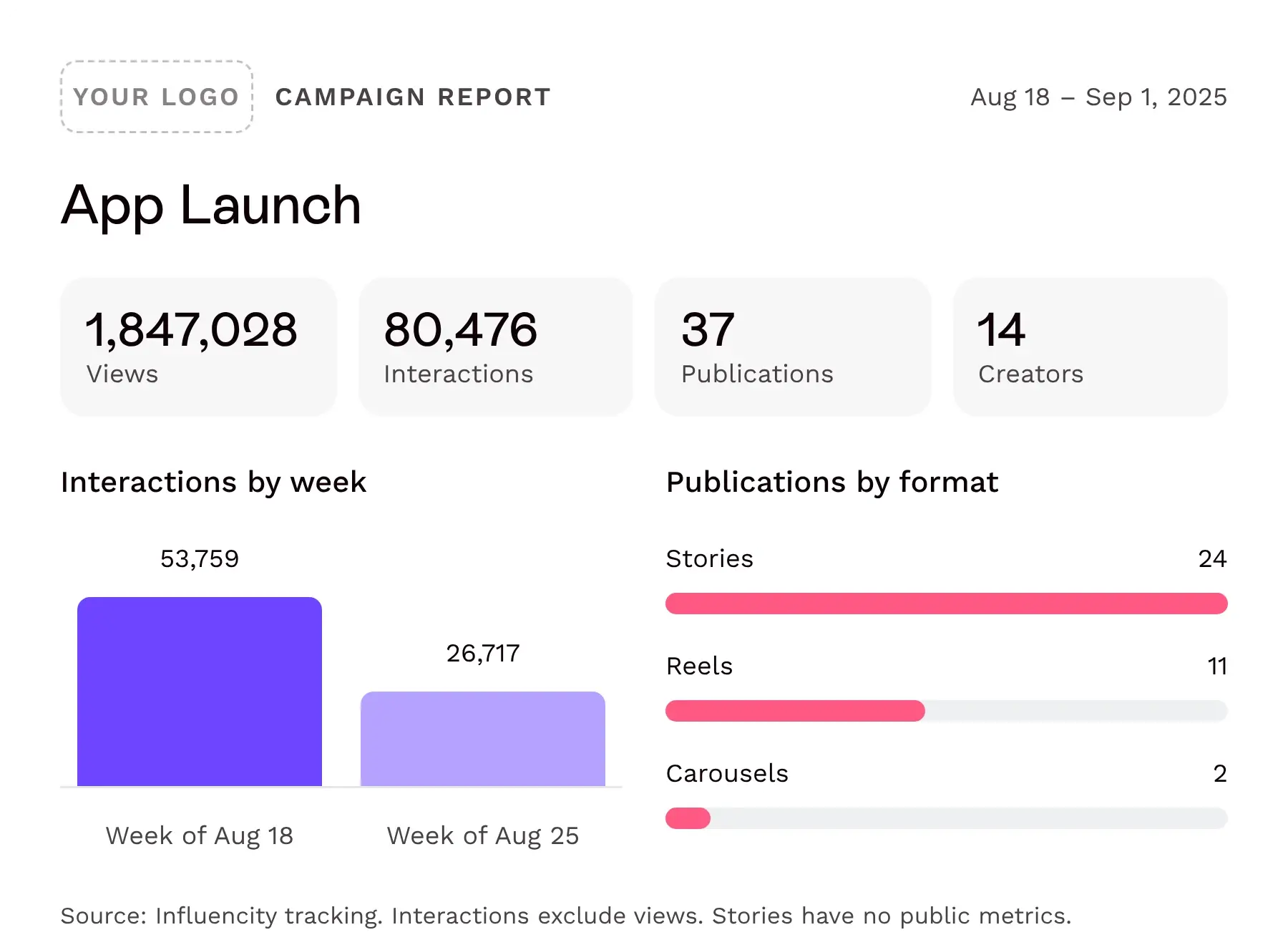
. It builds the report. Totals, top creators, formats and weekly evolution, in your layout.

. You send it. As a document, a slide or a page, without leaving Claude or ChatGPT.

Campaign report built in one sentence with the Influencity MCP
The Influencity MCP shows a preview with the cost before any change

YOU STAY IN CONTROL

Nothing Changes Until You Confirm

Preview before every change

Before analyzing, creating, pausing or deleting anything, the assistant shows a preview with the cost. If you say no, or 10 minutes pass, nothing changes.

Your own login

Each person signs in with their Influencity user on an Influencity page. The password is not stored.

One brand per connection

The assistant only sees the brand chosen at sign-in.

The AI you choose

The data the assistant reads goes to Claude (Anthropic) or ChatGPT (OpenAI), under that provider's terms.

MCP, API OR PLATFORM

Three Ways In, One Source of Truth

Same organization, same data, same credits. Pick the way in that fits the job.

MCP connectorAPIPlatform
Who uses itAnyone on the team, from Claude or ChatGPTYour engineers, inside your own systemsTeams working in the Influencity interface
Code neededNoneYes, REST with a bearer tokenNone
Best forReports, comparisons, trackings and texts on demandDashboards, data warehouses, BI tools and automated pipelinesThe full workflow, from discovery to payments
Creator discoveryComing soonOn the roadmapYes
CreditsThe same plan credits across all three. What you create in one appears in the others.

HOW TO CONNECT

Connected in About Two Minutes

Connector URL

https://mcp.influencity.com/mcp

1

Add the connector

In Claude: Settings › Connectors › Add custom connector. In ChatGPT: Plugins › Add custom MCP server. Paste the URL.

2

Sign in with Influencity

Use your usual Influencity email and password, choose the brand and click Authorize. No keys to copy.

3

Ask

Start a normal chat. The assistant answers in the language you write in.

It works on any Claude or ChatGPT account, free ones included. On Claude Team and Enterprise, an Owner adds the connector once for the organization. On ChatGPT Business and Enterprise, a workspace admin enables custom MCP servers. Read the full install guide

ACCESS & CREDITS

Added to Your Plan, Using the Credits You Already Have

READING Free

Profiles, trackings, publications, summaries and credits never use credits.

CREDITS Your plan

Analyses and tracking slots are used exactly as in the platform, always after a preview. No separate balance.

LIMITS Same as the app

The connector follows your plan's limits. What you can do in Influencity, you can ask for in the chat.

LICENSING Add-on for annual plans

The connector comes with API access, added to your existing plan and scaled to your tracking and analysis volume.

FAQs

Frequently Asked Questions About the Influencer Marketing MCP

Anything else, our team will answer on the first call.

icon-buble-pink-settings-connections

What is an influencer marketing MCP?

A Model Context Protocol server that connects an AI assistant to influencer marketing data and tools. Influencity's connects Claude and ChatGPT to your profiles, trackings and credits, so your team can work with them in plain language.

icon-buble-pink-chat

Which AI assistants does the Influencity MCP work with?

Claude and ChatGPT, on the web or the desktop app.

icon-buble-pink-hand-settings

Do I need developers to set it up?

No. You add the connector URL in Claude or ChatGPT and sign in with your Influencity user. There's no code to write and no keys to copy. The install guide walks you through it.

icon-buble-pink-search-user-star

Can it search for new creators?

Not yet. Today, discovering new creators happens in the platform. Search endpoints are next on the roadmap.

icon-buble-pink-diamond

Does it use my Influencity credits?

Reading never does. Analyses and tracking slots are used as in the platform, and always after a preview that shows the cost.

icon-buble-pink-locker

Can the AI change or delete data without my permission?

No. Before analyzing, creating, pausing or deleting anything, it shows a preview with the cost and waits for your confirmation. If you don't confirm within 10 minutes, the preview expires and nothing changes.

icon-buble-pink-users-likes

Which data can the AI see?

Only the data of the brand chosen at sign-in. One connection works with one brand.

icon-buble-pink-share-circle

Where does my data go when the AI reads it?

To the AI assistant you choose, Claude (Anthropic) or ChatGPT (OpenAI), under that provider's terms.

icon-buble-pink-hand-puzzle

What's the difference between the MCP and the API?

The API is for engineers building integrations into your own systems. The MCP lets anyone on the team use the same data from Claude or ChatGPT, without code. Both draw on the same credits.

icon-buble-pink-document-pie-chart-two-arrows-document-graph

Which plan do I need?

The connector comes with Influencity's API access, which is added to an existing plan on an annual contract. Your plan sets what the connector can access and do.

Influencer Marketing API Demo Request Calendar

Bring Influencity Into the AI Your Team Already Uses

Tell us how your team works and we'll set up your MCP access on the first call.

Influencer Marketing API Demo Request Calendar